Records every word.
Never records your face.
Meetng AI is a self-hosted meeting recorder for teams who would rather not hand their conversations to somebody else’s cloud. Audio and chat become one searchable transcript where every line already knows who said it. Video and screen share are live only, and are never stored.
Runs on one machine with Docker Compose. Postgres, LiveKit and Caddy included.
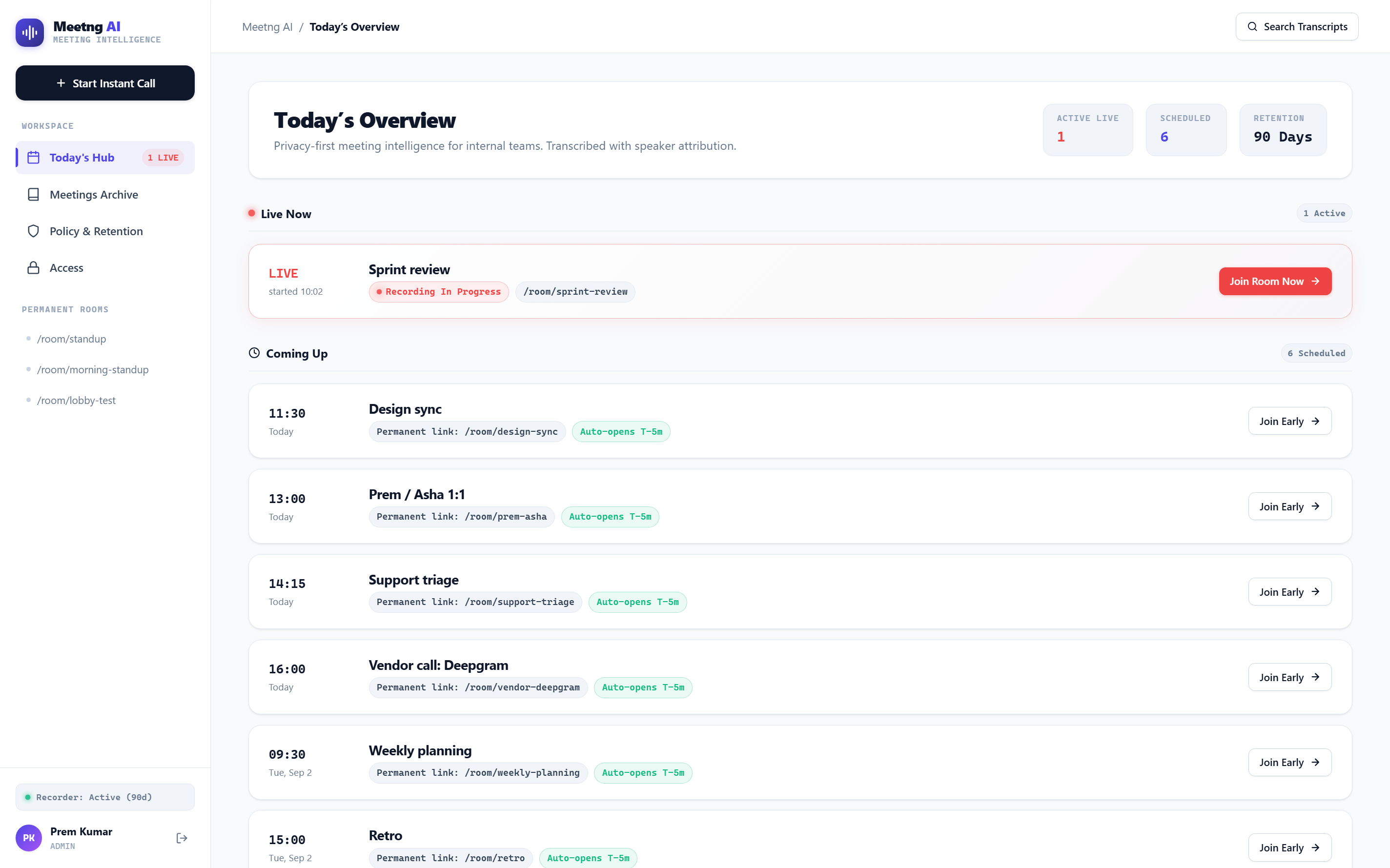
The workspace, on the morning of a normal week.
A line knows who said it because of how it arrived.
Most transcription tools record one mixed audio file and then work out afterwards which voice belonged to whom. That guess is called diarization, and it is wrong often enough to matter in a record people rely on. Meetng AI never has to make it.
Every microphone gets its own connection
Each person in the room streams their own audio on a separate channel. Nothing is mixed together before it is transcribed.
Text comes back while you are still talking
Each channel is transcribed on its own and words return live. There is no upload after the meeting, because there is no recording of the meeting as a whole to upload.
The name is attached on your server
Words arriving on one connection belong to the one person that connection carries. Attribution is a lookup, not an inference, and the names never leave your machine to make it.
Chat sits in the same timeline as speech, in the order things actually happened, so a decision typed rather than said is not the one part of the meeting that goes missing.
What actually leaves your server.
One outside service is involved, and it receives one thing. Audio goes to Deepgram to be turned into text. Everything else, including every name attached to that text, stays on the machine you are running this on.
| What | Where it goes | Detail |
|---|---|---|
| Meeting audio | Deepgram | Streamed live, one connection per microphone, and transcribed as you speak. Nothing is uploaded after the meeting ends. Deepgram receives audio and nothing else. |
| Speaker names | Stays local | Worked out on your own server from which connection carried the words. Never sent out, never received back. |
| Who attended | Stays local | No names, no email addresses, and nothing about who was in the meeting accompanies the audio. |
| Video and screen share | Never recorded | Live only. Not stored, not transcribed, and not sent anywhere at all. |
| Chat messages | Your database | Kept beside the spoken lines in the order everything happened, with who sent them and when. |
| Transcripts and summaries | Your database | On your machine, deleted on your own ninety day schedule. |
If you would rather part of a meeting did not leave the machine at all, the Pause button stops transcription for as long as you want it stopped, and nothing from the paused stretch is kept.
What you get once it is running.
A permanent room per recurring meeting, a transcript per meeting, and one search box across all of them.
Search everything anyone said
Search words spoken across every meeting and land on the moment they were said, not just the meeting they were said in.
Rooms that keep their address
A room's URL does not change. The link you send for standup is the link that works next week and the week after.
Decisions kept apart from actions
The summary for a meeting separates what was decided from what somebody agreed to go and do, because those are read by different people for different reasons.
Lines you can correct
A misheard line can be fixed by hand. The correction is kept along with the fact that a correction was made, so the record stays a record.
A lobby, not an open door
Someone holding a link who is not on the team waits in a lobby until a host lets them in. Being admitted to a meeting gives them that meeting, not the archive.
Access granted one person at a time
Whoever organised a meeting always has access to it, whether or not they attended, and can grant or remove access for any individual at any time.
A pause that really pauses
Stop the recording partway through a meeting for as long as you want it stopped. Nothing said or typed while it is paused is kept or sent anywhere.
Workspace domain or a plain list
Sign-in follows your Google Workspace domain if you have one. If the team is on personal Gmail, set an explicit list of addresses instead.
One compose file, on a machine you already pay for.
A Next.js app, a Postgres database, a LiveKit server for the calls themselves, and Caddy in front handling certificates. It is built to fit on a single small instance rather than a cluster.
# a domain, a Google OAuth client, a Deepgram key
$ cp .env.example .env
$ docker compose -f docker-compose.prod.yml up -d
You need a domain with records pointing at the box, a Google OAuth client with the callback registered, and a Deepgram API key. Certificates are issued automatically, including the one for the LiveKit subdomain that the call itself connects to.
The things people ask before trusting a recorder.
Does Meetng AI record video?
No. Meetng AI never records video or screen share. Both are live only: they are not stored, not transcribed, and not sent anywhere. What is recorded is audio, the transcript made from it, and messages typed into the in-call chat.
How does Meetng AI know who is speaking?
By which connection the words arrived on. Each person's microphone is streamed on its own separate channel, so the words coming back on one channel belong to the one person that channel carries. Attribution is a lookup rather than a guess, which means there is no voice fingerprinting and no diarization step that can assign a sentence to the wrong person.
Who transcribes the audio, and what do they receive?
Deepgram, a speech recognition service, transcribes the audio. It receives audio and nothing else: no names, no email addresses, and nothing about who was in the meeting. The speaker names shown on a transcript are worked out on your own server and are never sent out or received back. Audio is streamed live while the meeting runs, so no recording of the meeting as a whole is ever uploaded.
Where are transcripts and recordings stored?
On the machine you run Meetng AI on. The application, the Postgres database holding transcripts and summaries, and the recorded audio all live on your own infrastructure. Meetng AI is self-hosted with Docker Compose and there is no vendor copy of your archive.
How long is anything kept?
Ninety days by default, on your own deletion schedule and applying to your own copy. Because the deployment is yours, that schedule is a setting you control rather than a vendor policy you accept.
Can I stop the recording partway through a meeting?
Yes. The Pause button stops transcription for as long as you want it stopped. Nothing said or typed into chat while the recording is paused is kept or sent to the transcription service.
Do I need Google Workspace to use it?
No. A Google Workspace domain is the simpler option if your team has one, because access then follows whoever is in the Workspace with no list to maintain. If your team is on personal Gmail addresses, set an explicit list of allowed addresses instead, since Google sends no domain claim for ordinary Gmail accounts.
Can someone outside the team join a meeting?
Yes, with a link. Anyone who is not a member of the team waits in a lobby and a host decides whether to let them in. Being admitted gives them that one meeting. It does not give them the archive, past transcripts, or search.
What do I need before I can run it?
A machine that can run Docker Compose, a domain with records pointing at that machine for both the app and its LiveKit subdomain, a Google OAuth client with the callback URL registered, and a Deepgram API key. HTTPS certificates are issued automatically by the bundled Caddy.
What happens to a line the transcript got wrong?
You can correct it by hand. The corrected text replaces what was heard, and the fact that a correction was made is kept alongside it, so the transcript stays an honest record rather than one that quietly rewrites itself.
Start with your next standup.
Sign in with Google, open a room, and that link is the room from then on.